Session Leitner is not a list of due dates. It is a study day: you pick up a pile, work through it, and draw a line under the day when you are done.
If you want the history of the method—why a miss sends a card all the way back, and why a box is not a calendar—read What the Leitner System Is and Why Digital Apps Often Get It Wrong. This article is the other half: how that idea is wired in Leitiq and which buttons do what.
When to choose it
Use Session Leitner when you want a session you can actually finish. A vocabulary list, irregular verbs, exam terms—material you are happy to work in bursts rather than on a per-card clock.
Use Interval repetition (FSRS) when each card should have its own next date. Flat review when you only need Know / Don't know with no boxes at all.
You pick the plan the first time you study a deck, or later in deck settings. Changing the plan later clears that deck's saved scheduling. So does changing the number of stages. Confirm the reset if you already have progress.
What you are looking at
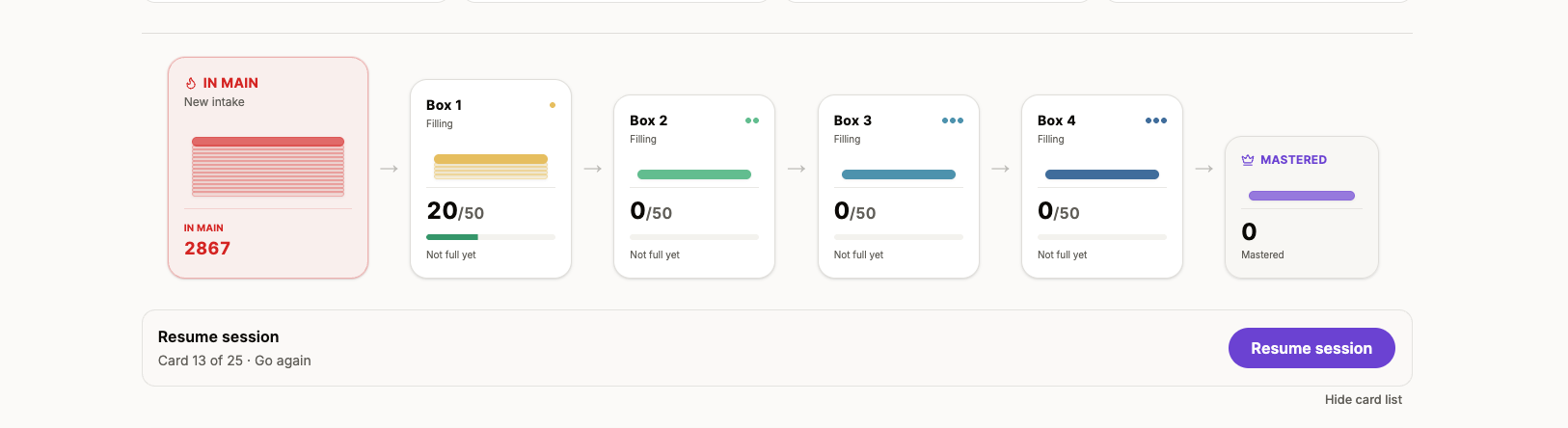
On the deck page, Session Leitner opens a study hub: a row of stacks.
- Main pile — new cards and cards you missed. This is box 0. It is the working pile.
- Learning boxes — numbered 1, 2, 3… A card that you know moves one box to the right. You do not review a learning box until it is full.
- Mastered — the last stage. A card that you know in the last learning box lands here.
Number of stages is the mastered box number, not the count of learning boxes. The default is 5:
Main → Box 1 → Box 2 → Box 3 → Box 4 → Mastered
Fewer stages means cards graduate faster. More stages means a longer climb.
The two pacing numbers
These live on the study hub (and in deck settings). They are the whole schedule. There is no per-card due date.
Box full threshold (default 50). When a learning box reaches this count, the next session reviews that box as one batch. If a box fills during a session, you review it before returning to where you left off.
New cards per intake (default 25). When no learning box is full, a session takes this many cards from the main pile.
If your deck is smaller than the threshold, a box may never fill. A 40-card deck with the default threshold of 50 can sit in box 1 forever. For a small deck, 10–20 is a reasonable starting point. Raise it later if the review batches feel too short.
Change these before you start the session. Today's card list is pinned when the session begins.
How a study day starts
Open the deck. The hub tells you what comes next.
If a learning box is full, you start a box review. The lowest numbered full box always goes first. If the box holds more cards than the threshold, you get a batch of that size. The rest wait in the same box.
If no learning box is full, you start a new intake from the main pile.
If the main pile is empty and no box is full, the hub is idle: nothing to start. Add cards, or lower the threshold so a box that already has cards now counts as full.
Today's sessions lists Session Leitner decks that still have a startable pile, or an open session to resume. After you call it a day, that deck drops off Today's list until the next study day. You can still open the deck and start another session from there.
An unfinished session stays open. Exit, close the laptop, come back tomorrow—the same pile is waiting. That is the point.
Know and Don't know
Session Leitner is binary. Flip the card (Space, or tap), then Know or Don't know. On a phone you can swipe right for Know and left for Don't know. Undo (U) reverses the last answer only.
What those buttons do depends on which kind of pile you are in.
New intake
New cards are not promoted the moment you rate them. They stay in a pending state in the main pile until you call it a day.
- Know — remembered for now. If that is still the last rating when the day ends, the card moves to box 1.
- Don't know — stays in the main pile for a later intake.
The first pass is a sort, not a graduation. If you Go again on the same intake, the later rating wins.
Box review
Here the boxes move immediately.
- Know — the card advances one box. From the last learning box, it becomes mastered.
- Don't know — the card returns to the main pile. Not one box back. All the way to the working pile.
A miss in box 4 is not “almost mastered.” It needs to be earned again.
Forced reviews
If your answers fill the next learning box while you are still studying, the session switches to that box. When the review finishes, you return to where you left off.
You may get more than one of these in a day. The lowest full box always goes first.
Ending the pile
When you finish the current pile, the session is still open. You get three choices.
End study day (same idea as Call it a day in the toolbar) commits the day:
- Cards you never reached in today's queue are marked Don't know.
- Intake cards are promoted or left in main according to their last rating.
- The session closes. Progress is saved.
Go again replays the exact same cards in the same order. After a box review, the promotions from the first pass already happened; the replay is extra practice. After an intake, the replay can still change whether those cards promote when you later end the day.
Back to the deck (Exit) leaves the session open. Nothing is committed. Resume when you are ready.
You can also call it a day in the middle of a pile. Whatever you have not seen yet counts as Don't know. If you are tired, Exit is the honest button. Call it a day is the commit.
New session appears after a day is already saved. It starts a fresh study day with a new pile from the current boxes.
Forgotten cards in the queue
In Account → Study preferences, Repeat forgotten card first vs Send forgotten cards to queue end applies to Session Leitner (and Flat review). It does not apply to FSRS.
During a session, a Don't know either jumps the card to the front of the remaining queue or sends it to the end. The same setting also chooses whether forgotten or never-seen cards come first in the next intake.
A deck can override the account default in deck settings.
Mastered stays mastered
Once a card reaches the mastered box, it stays there. Mastered cards are not queued for study again, and the plan never moves them back into a learning box. Mastered is the end of the box ladder.
A simple way to set it
For a new deck of a few dozen cards: stages 5, intake 15–25, threshold 10–20. Let box 1 fill, review it, and only then raise the threshold if the batches feel too small.
For a large imported list: keep intake modest so the first week is not a wall of new cards. The main pile can wait. Box reviews are the work.
Grade honestly. The plan only works if Don't know really means Don't know. A polite Know on a shaky card just delays the miss until a higher box, then dumps it back to main anyway.
If something feels stuck
Start is disabled / nothing queued. A learning box is not full and the main pile is empty. Lower the box full threshold, or add cards.
Today's sessions does not list the deck. You already called it a day, or there is no startable pile. Open the deck hub anyway.
I knew it, why is it still in main? You are still in an open intake, or you went again and the last rating was Don't know. Promotion waits for Call it a day.
I missed one card and the whole box vanished. A miss returns that card to main. The others stay. If you skipped the rest of a review and ended the day, those unseen cards were also marked Don't know.
That is the whole machine: a pile for today, boxes that fill, a day you can close. No backlog that follows you to bed unless you leave the session open on purpose.